
diff options
| author | grm <grm@eyesin.space> | 2026-03-14 02:29:15 +0200 |
|---|---|---|
| committer | grm <grm@eyesin.space> | 2026-03-14 02:29:15 +0200 |
| commit | 650e5afde271d22b3653832daf339e1bd09a10d6 (patch) | |
| tree | cc5e536b0150de1109daa43a055547d2266e60dd /lib/imgui-1.92.6/misc/freetype/README.md | |
| parent | 20e64711ce2a09b657fb79d59cb824e9e34d2b07 (diff) | |
| download | cgame-master.tar.gz cgame-master.tar.bz2 cgame-master.zip | |
Diffstat (limited to 'lib/imgui-1.92.6/misc/freetype/README.md')
| -rw-r--r-- | lib/imgui-1.92.6/misc/freetype/README.md | 54 |
1 files changed, 54 insertions, 0 deletions
diff --git a/lib/imgui-1.92.6/misc/freetype/README.md b/lib/imgui-1.92.6/misc/freetype/README.md new file mode 100644 index 0000000..6ea6ad1 --- /dev/null +++ b/lib/imgui-1.92.6/misc/freetype/README.md @@ -0,0 +1,54 @@ +# imgui_freetype + +Build font atlases using FreeType instead of stb_truetype (which is the default font rasterizer). +<br>by @vuhdo, @mikesart, @ocornut. + +### Usage + +1. Get latest FreeType binaries or build yourself (under Windows you may use vcpkg with `vcpkg install freetype --triplet=x64-windows`, `vcpkg integrate install`). +2. Add imgui_freetype.h/cpp alongside your project files. +3. Add `#define IMGUI_ENABLE_FREETYPE` in your [imconfig.h](https://github.com/ocornut/imgui/blob/master/imconfig.h) file to make Dear ImGui automatically use the imgui_freetype loader. If your copy Dear ImGui is precompiled, you can always enable imgui_freetype by calling ImFontAtlas::SetFontLoader(). + +### About Gamma Correct Blending + +FreeType assumes blending in linear space rather than gamma space. +See FreeType note for [FT_Render_Glyph](https://freetype.org/freetype2/docs/reference/ft2-glyph_retrieval.html#ft_render_glyph). +For correct results you need to be using sRGB and convert to linear space in the pixel shader output. +The default Dear ImGui styles will be impacted by this change (alpha values will need tweaking). + +### Testbed for toying with settings (for developers) + +See https://gist.github.com/ocornut/b3a9ecf13502fd818799a452969649ad + +### Known issues + +- Oversampling settings are ignored but also not so much necessary with the higher quality rendering. + +### Comparison + +Small, thin anti-aliased fonts typically benefit a lot from FreeType's hinting: +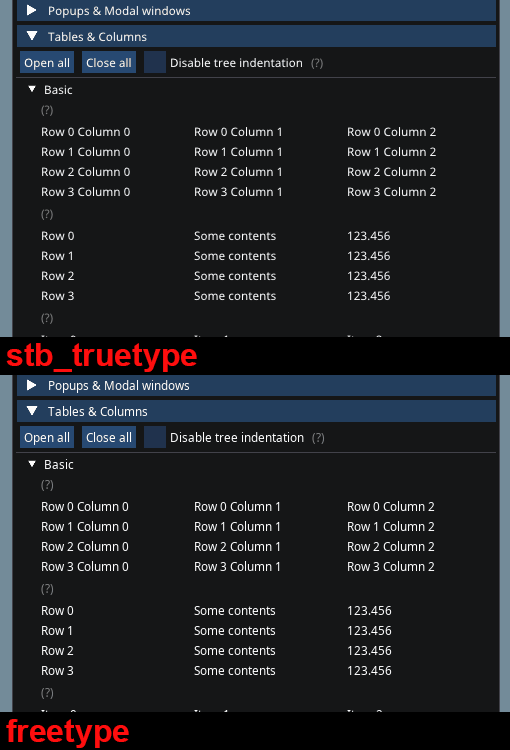 + +### Colorful glyphs/emojis + +You can use the `ImGuiFreeTypeBuilderFlags_LoadColor` flag to load certain colorful glyphs. See the +["Using Colorful Glyphs/Emojis"](https://github.com/ocornut/imgui/blob/master/docs/FONTS.md#using-colorful-glyphsemojis) section of FONTS.md. + +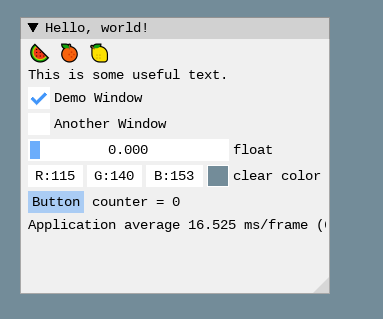 + +### Using OpenType SVG fonts (SVGinOT) +- *SVG in Open Type* is a standard by Adobe and Mozilla for color OpenType and Open Font Format fonts. It allows font creators to embed complete SVG files within a font enabling full color and even animations. +- Popular fonts such as [twemoji](https://github.com/13rac1/twemoji-color-font) and fonts made with [scfbuild](https://github.com/13rac1/scfbuild) is SVGinOT. +- Two alternatives are possible to render SVG fonts: use "lunasvg" or "plutosvg". plutosvg will support some more fonts (e.g. NotoColorEmoji-Regular) and may load them faster. + +#### Using lunasvg +Requires: [lunasvg](https://github.com/sammycage/lunasvg) v2.3.2 and above +- Add `#define IMGUI_ENABLE_FREETYPE_LUNASVG` in your `imconfig.h`. +- Get latest lunasvg binaries or build yourself. Under Windows you may use vcpkg with: `vcpkg install lunasvg --triplet=x64-windows`. + +#### Using plutosvg (and plutovg) +- Add `#define IMGUI_ENABLE_FREETYPE_PLUTOSVG` in your `imconfig.h`. +- Get latest plutosvg binaries or build yourself. Under Windows you may use vcpkg with: `vcpkg install plutosvg --triplet=x64-windows`. Alternatively, if you build imgui from vcpkg, you just need to enable the plutosvg feature: `vcpkg install imgui[plutosvg] --triplet=x64-windows` +- If you prefer to build plutosvg manually: + - Compilation hints for plutovg: Compile all source files in `plutovg/source/*.c` + Add include directory: `plutovg/include` + `plutovg/stb` + - Compilation hints for plutosvg: Compile `plutosvg/source/plutosvg.c` + Add include directory: `plutosvg/source` + Add define: `PLUTOSVG_HAS_FREETYPE` + Link with: plutovg, freetype |